Mineral Memory Addresses in BW 1.16.1
This entry is about mineral memory addresses in StarCraft: Brood War patch 1.16.1
Memory Scanner
I used cheat engine for memory scanning which can be downloaded here
Clicking on the download link doesn’t seem to download anything for me. I had to go to the link to download it.
Deselect any additional/optional programs when installing.
Finding your Mineral Memory Address
First select and open brood war in cheat engine.
I used chaos launcher to run brood war in windowed mode.
Create a single player game on Astral Balance.
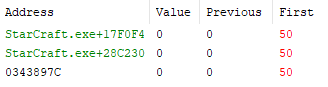
(New/first) Scan for the value 50. After training a peon and spending your minerals (next) scan for the value 0.
The scan found three memory addresses.
The value of the 2nd and 3rd addresses revert back to the original value after changing them.
So the first address is the address holding the mineral value.
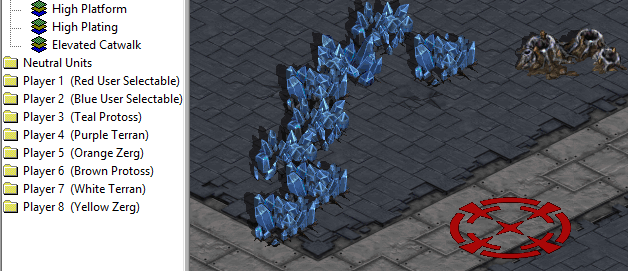
The map Astral Balance only has a top and bottom position.
When I am on the bottom position the mineral address is StarCraft.exe+17F0F0 (0x57F0F0) and StarCraft.exe+17F0F4 at the top position.
The mineral addresses goes up by 4 bytes.
The address for StarCraft.exe is 0x400000.
If you open the map C:\Program Files (x86)\Starcraft\Maps\BroodWar(2)Astral Balance.scm with StarEdit.exe you can see that Player 1 (Red User Selectable) is at the bottom.
While the 1st mineral address changes based on your starting location, the 2nd address which is StarCraft.exe+28C230 (0x68C230) and is only readable is constant even in a new game.
Finding your Player Number Memory Address
Create a single player game on Astral Balance.
(New/first) scan for the player number based on your position.
For example you are player 2 if you are on top and player 1 if on bottom.
Keep making a new game and (next) scan based on your player number.
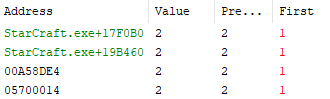
Eventually after switching player numbers you will find several addresses.
This address keeps track which player number you are.
StarCraft.exe+17F0B0 (0x57F0B0)
Finding your Mineral Address based on your Player Number
If during a game you read your player number from 0x57F0B0, subtract your player number by one, multiply by 4 and add by 0x57F0F0, then you can automatically find your mineral address and write to it.
For example:
#include <Windows.h>

int main(int argc, char** argv) {
  HWND bw_window = FindWindow(NULL, L"Brood War");

  DWORD process_id = 0;
  GetWindowThreadProcessId(bw_window, &process_id);

  HANDLE bw_process = OpenProcess(PROCESS_ALL_ACCESS, true, process_id);

  DWORD player_num = 0;
  DWORD bytes_read = 0;
  ReadProcessMemory(bw_process, (void*)0x57F0B0, &player_num, 4, &bytes_read);

  player_num--;
  int min_address = player_num*4 + 0x57F0F0;

  DWORD new_min_value = 555;
  DWORD bytes_written = 0;
  WriteProcessMemory(bw_process, (void*)min_address, &new_min_value, 4, &bytes_written);

  return 0;
}
C++ code was tested with Visual Studio 2019 on Windows 10.
Visual Studio should be run as administrator or OpenProcess doesn’t work.
Starter code was used from here
Delphi port of this code was tested on Delphi 12 on Windows 11 and also should be run as an administrator.
program Project1;
{$APPTYPE CONSOLE}

{$R *.res}

uses
  System.SysUtils,
  Windows;

var
  bw_window: HWND;
  process_id: DWORD;
  bw_process: THandle;
  player_num: DWORD;
  bytes_read: DWORD; //NativeUInt
  min_address: Integer;
  new_min_value: DWORD;
  bytes_written: DWORD; //SIZE_T (or NativeUInt)

begin
  bw_window := FindWindow(nil, 'Brood War');

  process_id := 0;
  GetWindowThreadProcessId(bw_window, process_id);

  bw_process := OpenProcess(PROCESS_ALL_ACCESS, True, process_id);

  player_num := 0;
  bytes_read := 0;
  ReadProcessMemory(bw_process, Pointer($57F0B0), @player_num, 4, bytes_read);

  Dec(player_num);
  min_address := player_num*4 + $57F0F0;

  new_min_value := 555;
  bytes_written := 0;
  WriteProcessMemory(bw_process, Pointer(min_address), @new_min_value, 4, bytes_written);
end.
Finding the instruction that subtracts minerals
First, attach starcraft into a debugger. I used x32dbg for this because starcraft is a 32-bit program.
I couldn’t find starcraft at first when trying to attach it. I checked “Enable Debug Privilege” in Preferences, Engine to see it.
After starting a game on Astral Balance, I put a Hardware, Write, Dword breakpoint on the address of my player number mineral.
The game paused on the instruction at 0x004672C2 after spending minerals.
mov edx, dword ptr ds:[eax+0x57F0F0]
mov ecx, dword ptr ds:[eax+0x6CA51C]
sub edx, ecx
mov dword ptr ds:[eax+0x57F0F0], edx
The eax register holds your player number in terms of 4 bytes (player 1 = 0, player 2 = 4)
Your mineral count is then moved to the edx register.
The mineral amount that is substracted is added to the ecx register and then substracted from the edx register.
The result in edx is then moved back to your mineral address.
Filling the instruction with NOPs prevents your minerals from being reduced anymore.